
 By REBECCA RUTHERFORD
Los Alamos
For the Los Alamos Daily Post
Summer is almost here, and apparently so are streaming subscription phishing emails. This week’s catch landed in my inbox trying to look very official, very urgent… and very fake.
Prime themed phish example
The email claimed to be from PrimeStream, clearly spoofing Amazon Prime. It had the branding, the button, the membership ID, the whole setup. It said payment had failed and subscription expired on May 25 and demanded a click to “Update Payment Details” RIGHT NOW. Today. No time to think.
Here’s the thing. The sender’s address was “gerry7ista1808@outlook.com”. Kinda catchy, but doesn’t sound super legit, does it? Spoiler, Amazon does not send billing alerts from Outlook accounts—few legitimate businesses do.
The actual email this was piggybacking on was also originally written in Italian and auto- translated by Gmail before it even hit the inbox. Amazon knows what language you speak.
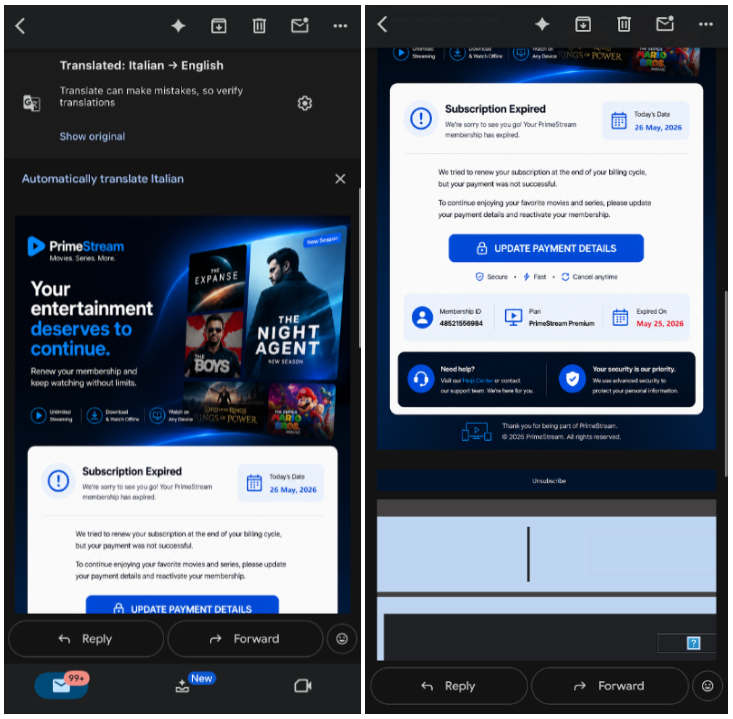 Prime themed phish examples. Courtesy image
Scammers just bulk-send and hope for the best. I’ve seen a ton of emails like this lately, the actual body is a legitimate email that was stolen from somewhere else, and it has an image at the top spoofing Amazon Prime, with a clickable link. Most are from Outlook or Hotmail addresses.
This style of attack is called a billing lapse phish. It creates a false sense of urgency around something you actually use and care about, a streaming subscription, a bank account, a utility bill. Fear of losing access is the hook. The fake button with the link is the trap. If you click it and enter your payment information, that data goes straight to whoever is running the scam, and boom your finances are compromised.
So, what should you do when you get a suspect billing lapse email?
- Never click payment links in emails, even if they look real, it’s easy to spoof a domain and make it look really close to the real thing. Open a fresh browser tab and go directly to Amazon.com or whatever service the email claims to represent. Log in there and check your actual account status. If nothing is wrong, nothing is wrong.
- Check the sender address before you do anything else. One quick look at the “From” field can save you a lot of trouble.
- If the email was originally in another language and got auto-translated, that is a significant red flag. Legitimate companies personalize their outreach, you aren’t likely to get an email from Amazon in Portuguese.
- Report it. In Gmail, hit the three dots next to the reply button and select “Report phishing.” That helps protect the next person. Other email clients will also have a reporting mechanism.
We are surrounded by screens constantly, and scammers know it. Stay skeptical, stay curious, and as always…stay safe, Los Alamos.
Editor’s note: Rebecca Rutherford works in information technology at Los Alamos National Laboratory.