
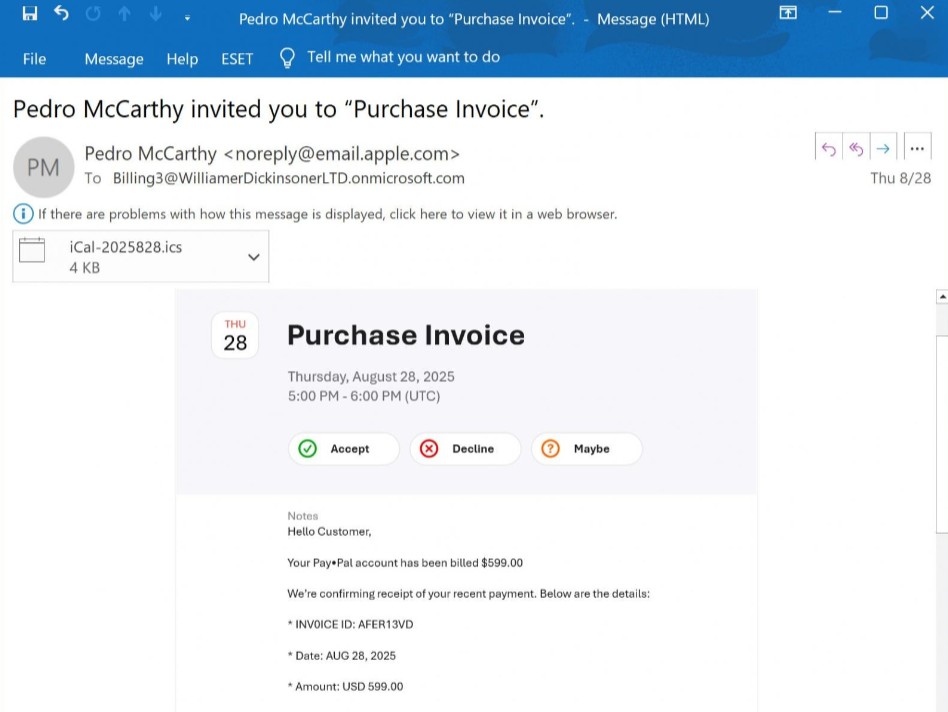
 Image of phish from bleepingcomputer.com
 By BECKY RUTHERFORD
Los Alamos
Calendar invites are pretty innocuous right? Unless they’re a phishing campaign…
According to reports from bleepingcomputer.com iCloud Calendar invites are being abused to send callback phishing emails disguised as purchase notifications directly from Apple’s email servers, making them more likely to make it through your spam filters, and into your inbox!
The above email was shared with Bleeping Computer by a reader, and claimed to be a payment receipt for $599 charged against the recipient’s PayPal account. The email included a phone number if the user wanted to discuss the payment or make changes to it – nobody wants a phone call! This is generally a good sign of a phishing email.
“Hello Customer, Your PayPal account has been billed $599.00. We’re confirming receipt of your recent payment,” read the email.
“If you wish to discuss or make changes to this payment, please contact our support team at +1 +1 (786).902.8579. Contact us to cancel +1 (786).902.8579,” continued the email.. Yikes!
The goal here is to trick recipients into thinking they’ve been charged fraudulently and calling the scam phone number. What happens next? The scammer will try to trick you into letting you connect them to your computer so they can get remote access to your system and steal your financial and personal information.
This is a pretty typical phishing scam, but what was odd was that it was sent from noreply@email.apple.com, passing the SPF, DMARC, and DKIM email security checks, signifying that it legitimately came from Apple’s mail server. This email is legitimately an iCloud Calendar invite, and the threat actor included the phishing text within the Notes field and then invited a Microsoft 365 email address that they controlled.
When the iCloud Calendar event is created and external people are invited, an email invitation is sent from Apple’s servers at email.apple.com from the iCloud Calendar owner’s name with the email address “noreply@email.apple.com” adding to the legitimacy of this scam. The theory is that the MS365 email address is actually a mailing list that forwards the email to a mailing list, and the mailing list members are the targets of this scam. Once again, legitimate features are being abused for phishing scams.
If you receive an unexpected Calendar invite with a strange message within, it should be treated with caution- chances are high it is a scam. Ignore these messages, and if you are concerned with possible charges, go independently to your account and check for any odd activity. Never call a number or click a link within an unexpected calendar invite. Delete and ignore and check via other channels!
Editor’s note: Rebecca Rutherford works in information technology at Los Alamos National Laboratory.