
 By REBECCA RUTHERFORD
For the Los Alamos Daily Post
Watch out for a new phishing scam targeting iPhone users … this scam sends targeted messages by email and text message to iPhone users trying to steal your Apple ID and can look very convincing.
Researchers at Symantec uncovered this scam last week, these links can lead to well-designed websites impersonating Apple, designed to steal your login credentials for your Apple account.
These sites can look very legitimate and many even include a CAPTCHA, adding to their seeming authenticity. These creds can be the “keys to the kingdom” for a hacker to get into multiple accounts, including your personal and financial data.
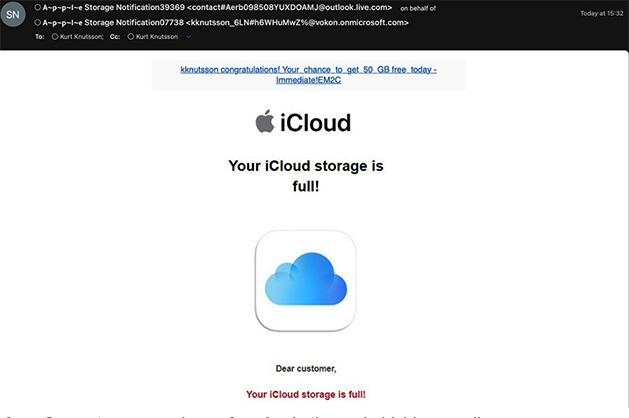 Image from Symantec researchers of an Apple themed phishing email
Note the odd email address, clearly originating from a non-Apple account full of strange dashes and overly long. Apple will only send messages about your account from an Apple email address, never from anything external.
What is Apple doing about these attacks? Apple does have guidelines to help users prevent successful phishing attacks:
- First of all, the best thing you can do is to make sure you have enabled multi-factor authentication (MFA). This protects your account by requiring and additional factor of authentication other than your username and password to access your account. It could be a text message, authenticator app, or a physical key like Yubikey. Never give out these authentication codes to a third-party.
- Apple will never ask you to disable MFA to “fix issues” in your account.
- Apple will only send emails from Apple domains and only send links directing you to Apple domains. As an example from a phishing text observed by Symantec, here is the domain that email would send you to: “Apple important request iCloud: Visit signin[.]authen-connexion[.]info/icloud to continue using your services” … clearly not an Apple domain. Odd characters and unfamiliar domains are indicators of a phishing scam.
- Apple will never request sensitive information about your account via text message.
- Avoid clicking links in suspicious emails or text messages at all costs. Go directly to the company’s website to login to your account.
These phishing email and text scams have also been impersonating other companies like Netflix, Amazon, etc. claiming account issues like expired credit cards. Legitimate companies will never request sensitive info via text, if you receive a suspicious text or email reach out to the company directly and avoid clicking links.
Watch out for this latest scam, and stay safe online! Don’t click that link, stop and think … if it seems off it’s a scam.
Editor’s note: Rebecca Rutherford works in information technology at Los Alamos National Laboratory.
 Phishing meme image